Exchange Online
Never lose a strata email again.
- Automatically saves emails as records
- Makes emails easy to find for audits and requests
- Keeps data for 7+ years to match legislation

In the "old days" every piece of correspondence, every report, every note was stored in a filing cabinet under the strata plan reference. Annually, these would be cleaned out and moved to the "archive" and every so often, the archive would be subject to some form of cleaning. This was all orderly, easily understood and, in most cases, just worked!
Along came computers and up-ended the applecart. Documents were stored in folders, folders and documents could be called anything and there was no easy way of archiving, or even knowing what was in what document. The advent of shared file servers made this even more challenging - files could be stored "locally" or "on the server". For most firms, this was the ultimate in chaos - documents named by recipient and not strata plan, or even just "minutes" ended up everywhere. Searching by term, impossible. Archiving by date, well was that create date, last modified date, or last accessed date?
In short, for most firms, electronic record keeping in the age of computers has been an absolute nightmare.
Microsoft 365 Modern Workplace changes this - it empowers NSW strata managers to meet mandatory electronic record-keeping rules seamlessly, turning compliance into a competitive edge with secure, user-friendly tools, that enable documents to "live" in the correct location, be archived by policy and available when needed.
From June 2024, when the amendment to the Strata Schemes Management Act was passed, all new strata records including financial statements, emails, minutes, and contracts, are required to be created and stored digitally. The 2025-2026 reforms ramp it up with e-voting, digital defect registers, and owner portals, slashing admin by 40% for forward-thinking schemes.
At Microsolve, we get it: you're busy building communities, not fighting with servers and software setups.
Our configurations make these legislative changes feel effortless, not enforced.
NSW strata laws now require electronic record-keeping, 7-year retention, and fast access for owners and Fair Trading.
Stay compliant without the hassle of paper files or lost emails with each of these tools:
Never lose a strata email again.
Your secure document library for every scheme.
Turn paper into searchable digital records instantly.
Automatically manages your compliance lifecycle.

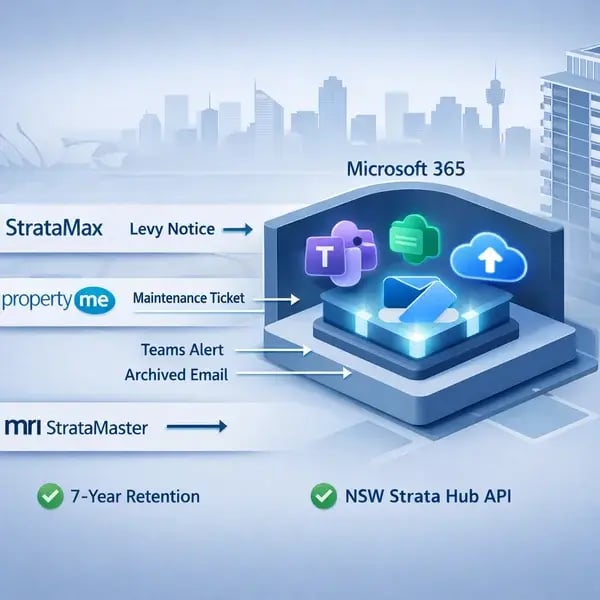
Strata managers juggle fragmented systems like StrataMax to pull levy data, PropertyMe to track maintenance, MRI StrataMaster for handling owner portals, and scattered emails flooding individual inboxes. Microsolve bridges these silos by integrating Microsoft 365 directly with your existing platforms, turning compliance chaos into automated workflows that run silently in the background.
Power Automate connects them seamlessly:
A new scheme in StrataMax instantly creates a compliant SharePoint site with 7-year retention enabled
PropertyMe tickets trigger Teams alerts and archive contractor replies before staff even see them. No more double-handling paper notices or lost email threads, simply snap a photo with OneDrive, OCR extracts the text, and it lands searchable alongside digital records from your platform.
This unified approach meets NSW Strata Act electronic record-keeping rules while freeing your team from manual data entry, so you focus on schemes, not spreadsheets.
The main ones are your strata roll, financial records like receipts and invoices, all emails and letters, meeting notices and minutes, and contracts with your strata manager or building manager. Keep these for 7 years minimum.
Absolutely. The law just says new records must also exist electronically. You can scan paper documents into OneDrive and use the phone app to snap photos of receipts or letters on the spot.
Microsoft 365 handles e-voting through Teams meetings, digital defect registers via SharePoint lists, and secure owner portals. Everything stays compliant with automatic retention and full audit trails.
Seven years from when each record was created. Microsoft 365 retention policies automatically hold documents that long, then securely delete them when they're no longer needed.
Current owners, mortgage holders, or buyers looking to purchase can request access. You must let them see records within 10 days. SharePoint makes this easy with secure view-only links.